LOE_COE Deep Dive Review
app.py
Create Shell Script button
Triggers create_shell_script()function.- Displays a form with inputs for nodes, GPUs, tasks, account, mail type, email, algorithm, and utility.
- User provides input and presses the "Create SH file" button
- Triggers
make_sh(*args): - Collects form inputs.
- Constructs SLURM directives and a Python command.
- Saves the shell script file with the specified configuration.
- Triggers
- User provides input and presses the "Create SH file" button
- Displays a form with inputs for nodes, GPUs, tasks, account, mail type, email, algorithm, and utility.
User presses the "Find buildings affected" button:
- Note : looks Like COE
- Triggers
water_main():- Collects the Asset ID.
- Calls
buildings_affected_by_watermain(asset_id).- Displays the list of buildings affected in the Streamlit interface.
- Connects to the buildings database i.e
URI_BLGS_DB = "data/dnv_coe_buildings.db - Executes SQL queries to find buildings affected by the specified water main.
- Merges the results of the queries into a single DataFrame.
- Displays the affected buildings in the Streamlit interface.
- Connects to the buildings database i.e
- Displays the list of buildings affected in the Streamlit interface.
User presses the "check" button:
- Note : LOE
- Triggers
check(): - Tests the connection to the database and displays the connection status
- connects to
URI_SQLITE_DB = "data/dnv_coe.db"(should rename to LOE) - Displays a success or failure message based on the connection status.
User presses the "check" button:
Note : LOE
Triggers
dataset_for_surv_analysis()Database Check:
- Connects to the SQLite database, connects to
URI_SQLITE_DB = "data/dnv_coe.db"(should rename to LOE) - Checks if the
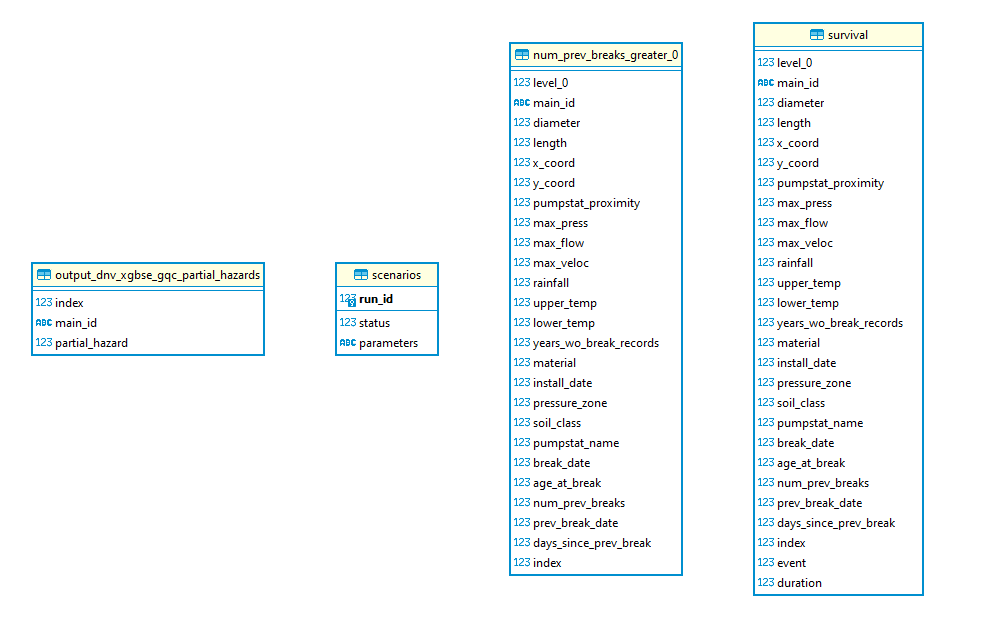
survivaltable exists.
- Connects to the SQLite database, connects to
Load Data:
- If the
survivaltable exists, loads data from the table.
- If the
Process Data:
- Cleans and processes the dataset, including handling missing values and calculating time-to-event.
Merge Replacement Dates:
- Loads replacement dates from a CSV file.
- Merges the replacement dates with the main dataset.
Calculate Duration:
- Uses study period settings to calculate the duration for survival analysis.
Save Data:
- Writes the processed data to the
survivaltable in the SQLite database. - Optionally saves the data to a CSV file if configured to do so.
- Writes the processed data to the
- User presses the "View Params" button:
Note : LOE
Triggers
view_params()- Display Parameters:
- Uses
st.markdown()to display predefined model parameters in the Streamlit interface.
- User presses the "Calculate Results" button:
- Note : doesn't work. LOE??
Triggers
config(args)Process: Display Spinner:
Displays a spinner in the Streamlit interface to indicate processing.
Load Configuration File:
Loads the configuration file (
.toml) for the specified utility.
User presses the "View Results" button:
- Triggers
make_scatter(args) - Generate Scatter Plots:
- Uses the
make_scatter()function to generate scatter plots based on the results.
- Uses the
- Display Plots:
- Displays the generated scatter plots in the Streamlit interface.
- Triggers
User presses the "Scenario Table" button:
- Triggers
scenarios(args) - Get Current Run ID:
- Retrieves the current run ID from the database.
- If no run ID exists, initializes it to 1. Otherwise, increments the maximum run ID by 1.
Insert New Scenario Entry:
- Inserts a new scenario entry into the
scenariostable in the database with the new run ID, status (set to 0), and parameters.
- Triggers
User presses the "View Scenario Table" button:
Triggers
view_scenarios(args)Connect to Database:
- Establishes a connection to the SQLite database.
Query Scenarios Table:
- Executes a SQL query to fetch all entries from the
scenariostable.
- Executes a SQL query to fetch all entries from the
Display Results:
- Displays the last five entries from the
scenariostable in the Streamlit interface. - If the
scenariostable is not found, displays a warning message.
- Displays the last five entries from the
ERD Diagrams
URI_SQLITE_DB = "data/dnv_coe_buildings.db"
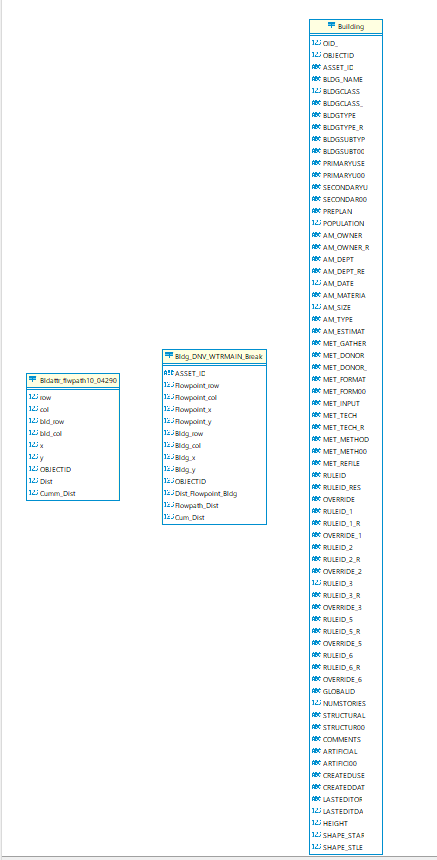
Note : (should rename to LOE)
URI_SQLITE_DB = "data/dnv_coe.db"